Customer Engagement · Case Study
My recommendations for simplifying onboarding messaging in customer communications.
This is a fictional - anonymized case study based on work in previous organizations.
1/3
Inquiries about redemption
1/3
Inquiries about account access
3
Deliverables created
Objective
Access and create training materials that reduce user confusion, minimize user calls, and simplify the onboarding process while highlighting the benefits of this employer-sponsored benefit program.
💡 Central Issue
Users consistently have trouble understanding the onboarding process for this third-party City Transit app. Currently roughly a third of user inquiries are related to redemption of credits, while roughly a third are related to account access. This means that the small user service team spends most of their day helping users onboard, and users are frequently frustrated with the process.
User Profile
The audience for this project are office workers who may or may not typically take the train or bus. They are tech-savy, but busy and will need to understand the instructions quickly. They are self-starters and will likely exhaust all other options before reaching out to customer support. However, at the point of reaching out, they may feel frustrated.
What I delivered
- FAQ list
- Onboarding Road Map Infographic
- User Interview Template
Process Map
How should the process work?
Users receive an employer-covered digital commuter card for train rides. In addition, they can receive free parking credits if they complete online education modules on pollution, environmentalism, etc.
- User receives an invite from the app via email and text.
- User taps the invite link and creates an account (password + verification).
- User is confirmed as eligible.
- User taps Connect City Transit, signs in on the transit portal, and authorizes the link; they return to the app connected.
- User views the Credits dashboard (ride credits available; parking credits require module completion).
- User taps Redeem ride credit → credits are added to their City Transit account. (potential pain point. users don't understand they need to click redeem button)
- (Optional) User goes to the Learn tab and completes the monthly module to unlock parking credit.
- If completed, user returns to Credits and taps Redeem parking credit → credits are added to their City Transit account.
- Each month: ride credits refresh automatically; parking credit is only available if the module is completed and redeemed.
Potential pain points in the process:
- User doesn't have a City Transit account and must create one.
- Users don't understand they need to click the Redeem button (ride credit).
- Users don't understand they need to click the Redeem button (parking credit).
Deliverables
1) Onboarding Road Map Infographic
The goal was to create a streamlined, branded infographic that describes the onboarding process in a way that can be digested quickly. It was important to create a document that can be used on mobile as well as desktop.
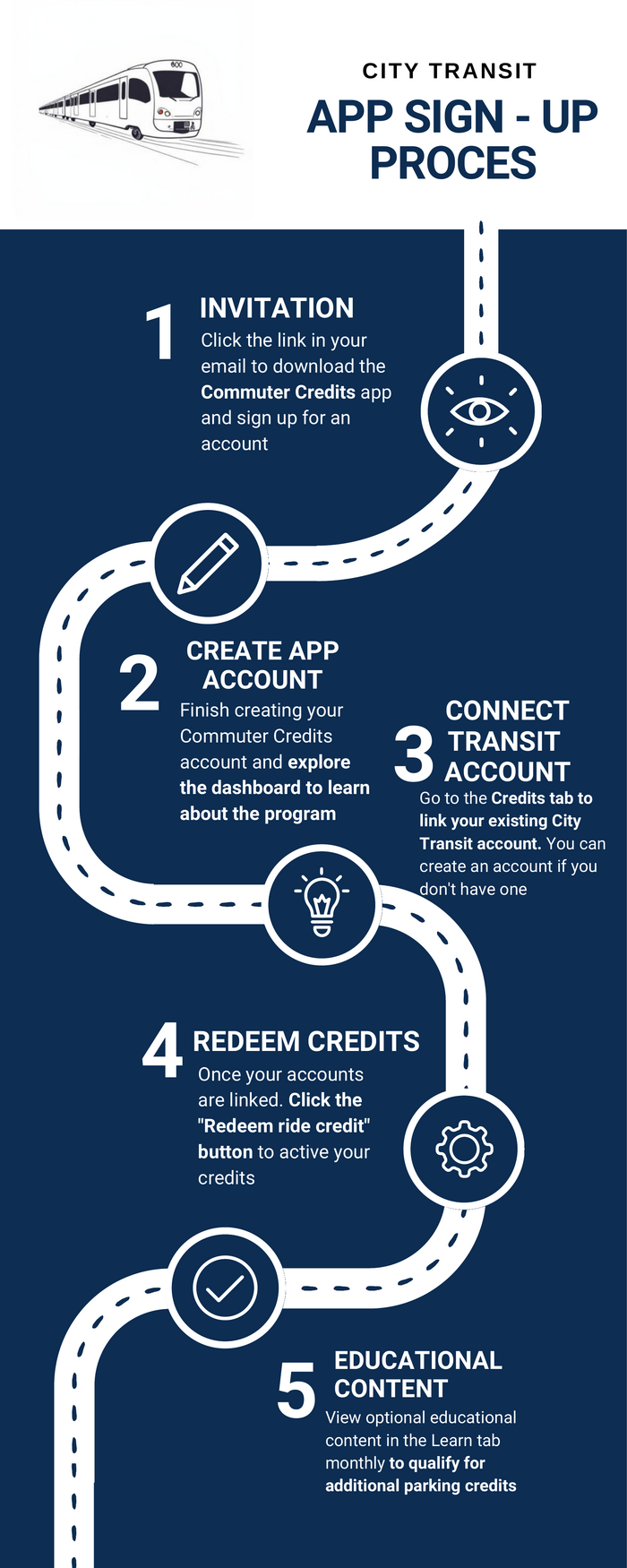
2) FAQ List
The goal was to create a comprehensive FAQ list that addresses every step of the onboarding process. It is broken down into 3 main categories: Account Access, Connecting Existing Account, and Continued Credit Usage.
Please note, the City Transit email address and website were intentionally left blank as this is a fictional organization.
Complete FAQ List
Accessing Your Account:
I didn't receive my invite email or text
Please check your spam and junk folders. Confirm which email your employer has on file for your account. If you do not see the email, send an email to [city transit email address] for a resend.
The link to sign up doesn't work.
Please head to the [city transit website] to create an account directly.
I am "ineligible" according to my status on the site
Please confirm with your employer that your most up to date contact information was sent to our team.
I'm still listed as ineligible after confirming with my employer
Please send an email to [city transit email address] for further assistance.
Connecting Your City Transit Account:
I've created my account, but I'm not able to connect with the City Transit portal. I receive an error message
Try closing the app and reopening. Refresh the City Transit page as well. If this does not fix the issue, please send an email to [city transit email address].
I don't have a City Transit account, how can I receive this benefit?
You will be able to create your transit account during the onboarding process. If you receive an error when creating your transit account, please go directly to the City Transit site and create an account there using the same email address.
I've connected my accounts, now what do I do?
If you have available credit in the app, you will see the option to Redeem your credits on the dashboard. Once you click that button, you're ready to use your credits!
How Can I get My Credits?:
How can I get additional credits for parking?
Navigate to the Learning tab. There will be new educational content there each month. Once you review all of the new content for the month, you will receive additional credits.
Are the credits added automatically each month?
Your $50 credit will be added to your account automatically each month as long as you are eligible. Your additional credits will only be added once you complete the month's learning modules.
What type of educational content is there?
The content will center around transportation, environmentalism, and the benefits of public transit. It will rotate monthly. If you have suggestions please email [city transit email address].
3) User Experience Interview Template
The goal was to have an initial UX interview with a pre-selected user and provide insights based on the conversation. We would then use that conversation as a template for future interviews in an ongoing process of improvement.
In order to start the process, I conducted a short interview with a user and observed their process of navigating the onboarding process as well as clicking through the app. I shared the existing instructional materials along with an existing FAQ list that was created in the past. The user shared what they liked, disliked, and would like to see in future iterations of the app. The condensed interview is included below, followed by my final project insights.
Please note, the user walked through a real app onboarding process for a similar app, and the data has been anonymized as much as possible.
Condensed UX Interview
Do you feel that the instructions explained the onboarding process well?
"Yes, overall it did. I was a little confused because the (old) instructions combined multiple steps into one. For example register and download the app are listed as the same step."
Did you find the process confusing at any point?
"Not really. I noticed that the registration form didn't scroll to the top initially so I did skip a few questions on accident."
What was the hardest or easiest part of the process?
"Once I fully understood the (old) instructions, it was easy. Because you're logging in multiple times (app account + City Transit account) you could forget your password easily. I noticed that I didn't fully read the instructions initially. I clicked the first link I saw in the email, and immediately went to the app. It might be worth rearranging or simplifying the instructions."
On a scale of 1-5, how confident would you be registering for yourself?
"5 out of 5."
Post-Project Insights & Recommendations
Throughout the project, I worked to better understand the challenges that both users and employees face during the onboarding process. I've included my final thoughts below:
- Recommendation #1 - Users need multiple reminders of the onboarding process. Although there were detailed instructions in the invite email, the user I interviewed skimmed them and clicked on the first link they saw. I would recommend adding brief instructions into the app on relevant pages as well.
- Recommendation #2 - Employees also felt confused with the onboarding process at times. My next step in this process would be to create flow charts to answer commonly asked questions that employees can contribute to over time.
- Recommendation #3 - There are a few key metrics tracked by employees now. I would recommend creating a way to track the improvement in these metrics over time.